




If you’re curious about Paltalk, one of the longest-running live group video chat platforms, this review gives you a clear, no-nonsense look at how it works, what it does well, and where it falls short. Whether you want casual conversations, topic-based rooms, or a place to host your own community, Paltalk offers a mix of old-school chat room energy and modern video features. Here’s how Paltalk stacks up in 2025, and whether it’s the right fit for you.
At a Glance
- What it is: A live video, voice, and text chat platform centered on public and private chat rooms.
- Ideal for: People who enjoy open-topic rooms, hobby or interest communities, and casual social discovery.
- Pricing: Free with ads: optional paid tiers and in-app gifts.
- Standout features: Multi-user video rooms, mic queues, room moderation tools, virtual gifts, and cross-platform support.
- Biggest trade-offs: Inconsistent room quality, legacy UI vibes on desktop, and variable moderation outcomes.
Bottom line: Paltalk is best if you want the spontaneity of live group chat and don’t mind a bit of randomness. If you prefer structured communities or work-grade calls, you may want an alternative.
What Is Paltalk?
Paltalk is a social chat platform built around live video rooms where you can turn on your camera, mic up in a queue, or just text quietly in the chat. Unlike one-to-one video apps, Paltalk emphasizes open rooms grouped by interests, music, current events, language learning, dating, gaming, and more. You can browse rooms, join as a viewer, or host your own space with moderation controls.
If you grew up on classic chat rooms, Paltalk will feel familiar, only with live cams, modern stickers, and gifting layered on top. It’s more about social discovery and community hanging out than it is about professional meetings or private video calls.
How Paltalk Works
Matching and Connection Flow
- Browse categories or search topics to discover rooms.
- Preview video tiles and text chat before engaging.
- Join as a viewer, then request mic/cam when you’re ready.
- Some rooms require approval to speak: many allow instant text participation.
- You can follow rooms or users to see when they go live.
Account Requirements and Access
- You’ll create a username, password, and basic profile: an email is typically required for verification and account recovery.
- Free accounts can join rooms, chat, and use basic video. Paid tiers remove ads and unlock perks like room creation settings, nick color customizations, or enhanced visibility.
- Expect community guidelines: rooms with adult themes are usually labeled, and age restrictions may apply.
Supported Devices and Platforms
- Desktop app (Windows/macOS) for full-feature room hosting and moderation.
- Mobile apps (iOS/Android) for on-the-go browsing and participation.
- Web access varies by region and updates: the core experience is stronger on the native apps.
Key Features
Core Chat Features
- Public and private rooms with multi-video layouts.
- Text chat alongside video with emojis and quick reactions.
- Mic queues so conversations stay orderly when rooms get busy.
- Room roles (owner, admin, member) for structured moderation.
Filters, Effects, and Interaction Tools
- Basic camera effects and backgrounds help you look presentable quickly.
- Stickers, reactions, and virtual gifts add energy during live moments.
- Follow/subscription options to keep up with favorite rooms.
Optional Paid Features
- Ad-free experience and profile customizations (e.g., nickname colors or badges).
- Room creation/configuration upgrades and advanced moderation tools.
- In-app currency for gifting, which can boost visibility or support hosts.
Note: Specific tier names and benefits can change over time, check the latest in-app details before you purchase.
User Experience (Mobile vs Desktop)
Interface and Navigation
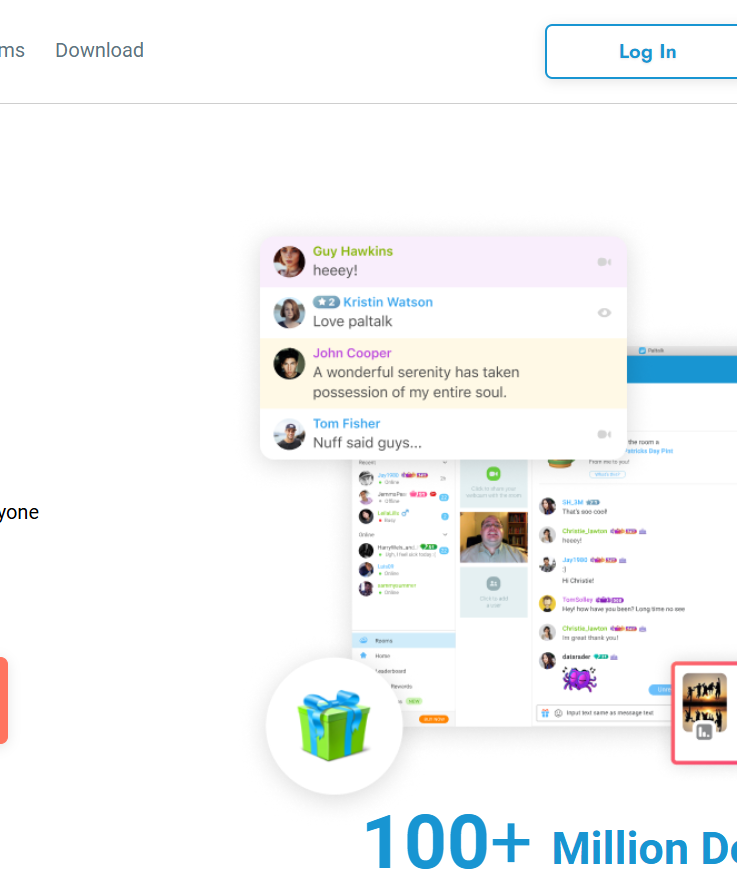
Paltalk keeps the focus on rooms: a left-hand directory (desktop) or tabbed navigation (mobile), a grid of video tiles, and a persistent text chat. It’s not flashy, but it’s functional.
Ease of Use for New Users
- Join a room, observe, then unmute when you’re comfortable, low-pressure onboarding.
- Clear indicators for who’s live on mic, who’s moderating, and how to request speaking.
- Tooltips and prompts are decent on mobile: desktop offers more power with a slightly steeper learning curve.
Differences Between Mobile and Desktop
- Desktop: Best for hosting, managing queues, and multi-window multitasking.
- Mobile: Best for casual browsing and hanging out: fewer granular controls.
- Video quality is comparable, but desktop generally handles multiple streams more smoothly on strong connections.
Safety, Privacy, and Moderation
Age Controls, Reporting, and Blocking
- You can report users, mute, or block quickly from profile menus.
- Rooms labeled for mature audiences are common: avoid them if you’re underage or prefer PG spaces.
- If you’re a parent or guardian, check device-level restrictions and discuss safe online behavior.
Moderation Approach and Limitations
- Room owners and admins set the tone: they can kick, ban, or promote members.
- Platform-level moderation addresses ToS violations, but enforcement can feel uneven. Community-led rooms vary widely in civility.
- As with many live platforms, real-time abuse can occur: the fastest remedies are often room-level tools and immediate blocking.
Data Collection and Account Security
- Expect standard data for account login, device info, and usage analytics typical of social apps.
- Use a strong, unique password and enable any offered security features.
- Be mindful of what you share on camera and in public chats, assume public visibility unless you’ve confirmed otherwise.
Performance and Reliability
Connection Speed and Stability
On decent broadband or 5G, Paltalk is generally stable. Entry into rooms is quick, and text messages post instantly. Older Wi‑Fi and congested networks can cause lag, especially in busy rooms.
Video and Audio Consistency
- Video tiles adapt to bandwidth: expect resolution scaling under weak connections.
- Audio typically stays intelligible even when video drops, good for chat-first rooms.
- Headsets reduce echo and make you a better guest in crowded spaces.
Common Technical Issues
- Camera permissions not granted (browser or OS) leading to blank tiles.
- Outdated desktop app causing crashes, keep it updated.
- Mobile battery drain during long sessions due to continuous streaming.
- NAT/firewall quirks on corporate networks blocking video.
Community and Conversation Quality
User Demographics and Intent
Paltalk attracts a broad mix: long-time chat room regulars, casual socializers, hobbyists, language learners, and music fans. You’ll also find regional communities with their own norms and slang.
Typical Interaction Quality
Room culture is everything. Some rooms feel like friendly cafés: others are chaotic. Well-moderated spaces with clear topics and mic rules deliver the best experience. Rooms without active moderation can drift off-topic or get noisy fast.
Time-of-Day and Regional Variations
- Prime time (evenings and weekends) yields more rooms and live cams.
- Regional rooms spike during local evenings: try different time zones for better fit.
- Niche rooms (e.g., language exchange) often schedule recurring sessions, follow them to catch the good ones.
Pros and Cons
- Live, multi-video rooms recreate the energy of in-person hangouts.
- Strong room tools: mic queues, admin roles, and configurable permissions.
- Cross-platform with quick joining, great for spontaneous drop-ins.
- Optional gifting helps creators sustain active rooms.
- Quality is hit-or-miss across rooms: you may need to browse a lot.
- Legacy UI elements on desktop can feel dated compared with newer apps.
- Moderation varies: some rooms can be unruly or adult-leaning.
- Advanced perks sit behind paywalls: ads on free tiers can be intrusive.
Paltalk vs Alternatives
Comparison With Similar Platforms
| Platform | Best For | Strengths | Trade-offs |
|---|---|---|---|
| Paltalk | Live group video chat rooms | Real-time rooms, mic queues, gifting, cross-platform | Inconsistent room quality: dated UI in places |
| Discord | Structured communities with text/voice/video | Channels, roles, bots, persistent history | Setup/admin learning curve: video is secondary |
| Zoom | Meetings and classes | Reliable video, breakout rooms, enterprise features | Not designed for public discovery or casual social rooms |
| Tinychat | Lightweight video chat rooms | Quick room creation, minimal friction | Smaller user base: variable moderation |
| Clubhouse | Live audio rooms | Drop-in audio, discovery via topics | Audio-only: less visual engagement |
When an Alternative May Be Better
- You want persistent communities and threaded discussions: Choose Discord.
- You need professional meeting tools and recording: Go with Zoom.
- You prefer audio-only hangs with topic discovery: Try Clubhouse.
- You want ultra-simple, throwaway rooms: Tinychat fits the bill.
- If you specifically want live, video-forward social discovery, Paltalk remains competitive.
Who Should Use Paltalk?
Best-Fit Users
- You enjoy spontaneous socializing and don’t mind sampling several rooms to find your vibe.
- You want to host a casual community with live cams and clear mic rules.
- You like the energy of gifting, stickers, and event-style sessions.
Who Should Skip This Platform
- You need professional-grade meetings, recordings, or whiteboards.
- You want strictly curated, family-safe spaces without adult themes.
- You prefer asynchronous, threaded conversation over live chatter.
Final Verdict
If you’re after live, camera-on social rooms, Paltalk delivers the goods, especially when you land in a well-run community. The platform isn’t perfect: moderation can be uneven, some UI feels dated, and the best perks sit behind paid tiers. But for casual discovery, hobby hangouts, and hosting your own open-mic style space, Paltalk is still relevant in 2025.
Recommendation: Try the free tier first. Find two or three rooms you genuinely enjoy, follow the hosts, and consider a paid upgrade only if you want ad-free viewing, deeper customization, or more robust room controls. Used thoughtfully, Paltalk can be a lively, camera-forward alternative to text-heavy community apps.
Frequently Asked Questions about Paltalk
What is Paltalk and how does it work?
Paltalk is a live group video, voice, and text chat platform built around public and private rooms. You browse categories, preview video tiles and chat, then join as a viewer. When ready, request the mic or camera. Rooms use roles and mic queues to keep conversations orderly.
Is Paltalk free, and what do paid tiers unlock?
Yes—Paltalk offers a free, ad-supported tier for joining rooms, chatting, and basic video. Paid tiers remove ads and add perks like profile customizations, enhanced visibility, room creation/config options, and advanced moderation tools. Specific tier names and benefits can change, so check the latest in-app details.
Is Paltalk safe for teens and adults? How is moderation handled?
Safety varies by room. Owners and admins can kick, ban, or promote users, while platform-level moderation addresses Terms of Service violations, though enforcement can feel uneven. Mature rooms are labeled; age restrictions may apply. Use reporting, blocking, and strong account security, and avoid sharing sensitive information on camera.
Paltalk vs Discord or Zoom: which should I use?
Choose Paltalk for spontaneous, live video chat rooms and social discovery. Pick Discord for structured, persistent communities with channels and bots. Use Zoom for professional meetings, classes, and recording. Tinychat suits quick, lightweight rooms; Clubhouse is best for audio-only hangouts without video.
Does Paltalk use end-to-end encryption?
Paltalk generally uses industry-standard encryption in transit to protect data as it moves, but it is not positioned as a fully end-to-end encrypted platform for public, multi-user rooms. If you need E2EE for sensitive communications, consider tools designed specifically for private, end-to-end encrypted calls.
How can I fix lag or poor video quality on Paltalk?
Use reliable broadband or 5G, switch to a wired or stronger Wi‑Fi connection, and close bandwidth-heavy apps. Update the desktop or mobile app, grant camera/mic permissions, and try a headset to improve audio. If on a corporate network, NAT/firewall rules may block video—try a different network or VPN.